Wallpapers
This repository ships a small curated set of wallpapers under
.local/share/wallpapers/.
The directory is stow-packed, so the files symlink into ~/.local/share/wallpapers/
(the XDG-compliant location) on stow apply.
For a visual index, browse the directory on GitHub — the file listing renders inline thumbnails for each image.
Included wallpapers
| File | Description |
|---|---|
beach.png |
Painterly anime tropical cove — turquoise surf, sand crescent, palm fronds framing lush green hillsides under a bright sky. |
gojo-sensei.jpg |
Satoru Gojo (Jujutsu Kaisen) in profile, white-flame hair and blindfold against a magenta/violet inferno on near-black. 4K. |
gojo-sensei-dark.png |
Gojo lifting his blindfold to reveal cyan eyes, conjuring a purple cursed-energy orb in a dark cosmic void. |
london-night.png |
Storybook illustration of the London skyline at night — Big Ben, the Shard, St Paul's, an airship, and a crescent moon over the Thames. |
mountain-valley.png |
Sunlit Genshin-style meadow strewn with blue wildflowers, drifting petals, and distant cliffs under cumulus clouds. |
totoro.jpg |
Studio Ghibli's Totoro and Chibi-Totoro perched on a cloud bank beneath a dense starfield, umbrella in hand. 4K. |
window-skyline.png |
Anime interior looking through an open window onto a patchwork valley with a domed hilltop temple in the distance. |
your-name.jpg |
Kimi no Na wa–inspired silhouette on a grassy ridge beneath an aurora-streaked sky and falling comet trails. 16K. |


If you fork this repo and add your own, drop them in .local/share/wallpapers/
and they'll be picked up by stow on the next apply.
macOS
Apply a wallpaper from a path:
osascript -e 'tell application "System Events" to tell every desktop to set picture to "/path/to/wallpaper.png"'
Or use wallpaper (Homebrew formula) for a less verbose CLI. For example, to
set the bundled Gojo wallpaper:
Automatic rotation
macOS can rotate through the entire ~/.local/share/wallpapers/ folder
without any third-party tools. Open System Settings → Wallpaper and:
- Click Add Folder… (the
+next to Pictures) and pick~/.local/share/wallpapers/. It will appear as its own section — in the screenshot below it's the row labelled wallpapers. - Select the folder thumbnail so its name appears at the top of the right-hand pane.
- Set the display mode (e.g. Fill Screen).
- Set Shuffle to On Wakeup and tick Randomly so each unlock picks a different image at random rather than cycling in order.
- Enable Show on all Spaces so every Space picks up the rotation.
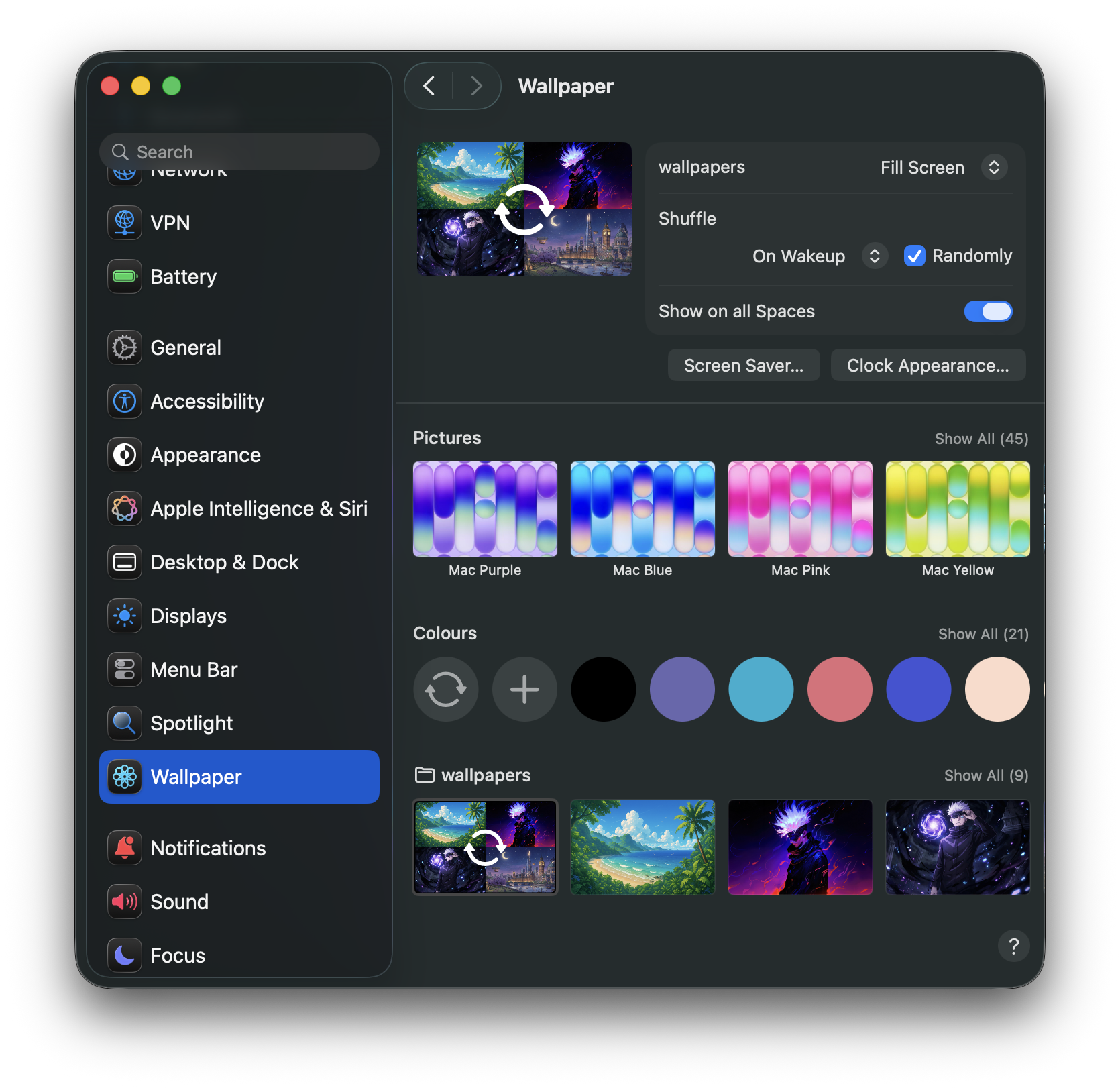
Other useful Shuffle intervals: Every Hour, Every Day, Every 5/15/30 Minutes, or Only When Clicking Shuffle for manual control.
Recommendations
Cyberdream pairs well with high-contrast neon-on-near-black images. The
bundled gojo-sensei.jpg and gojo-sensei-dark.png were chosen with this
palette in mind. Other directions worth exploring:
- Solid
#16181A(the cyberdream background) — minimal and lets the prompt do the talking. - Synthwave / Outrun palettes with magenta and cyan accents.
- Photos of city lights at night.